




Zum Inhalt springen
In der App anzeigen

Eine bessere Möglichkeit zum Browsen. Mehr erfahren.

Arteum Digital

Eine Vollbild-App auf Ihrem Startbildschirm mit Push-Benachrichtigungen, Badges und mehr.

So installieren Sie diese App unter iOS und iPadOS
  1. Tippen Sie in Safari auf das Teilen-Symbol
  2. Scrollen Sie durch das Menü und tippen Sie auf Zum Home-Bildschirm.
  3. Tippen Sie oben rechts auf Hinzufügen.
So installieren Sie diese App unter Android
  1. Tippen Sie oben rechts im Browser auf das 3-Punkte-Menü (⋮).
  2. Tippen Sie auf Zum Startbildschirm hinzufügen oder App installieren.
  3. Bestätigen Sie, indem Sie auf Installieren tippen.

Live Clock 1.0.0

(0 reviews)

2 Screenshots

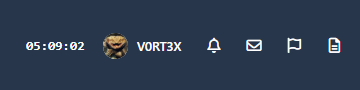
New version of my old Live Clock plugin for IC4 and, incidentally, my first application for IC5, more for testing purposes.

I still find it quite useful, as I generally disable the clock in the OS.

Benutzerfeedback

Sie können erst eine Rezension abgeben, nachdem Sie die Datei heruntergeladen haben.

Es sind keine Bewertungen zum Anzeigen vorhanden.

Konto

Navigation

Suche

Suche

Configure browser push notifications

Chrome (Android)
  1. Tap the lock icon next to the address bar.
  2. Tap Permissions → Notifications.
  3. Adjust your preference.
Chrome (Desktop)
  1. Click the padlock icon in the address bar.
  2. Select Site settings.
  3. Find Notifications and adjust your preference.